![ringy-logo.svg]](https://www.ringy.com/hubfs/ringy-logo.svg)
Go to the ‘Lead Vendors’ page in the left hand menu then click the purple pencil beside the specific vendor. In the top right corner you will see a drop down option that reads “Integration Details,” once you click that you will see your SID and Auth token.
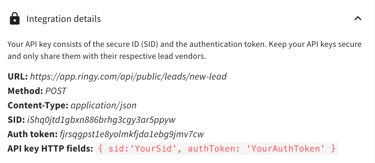
For more information on adding lead vendors to your account, please refer to this article: Lead Vendor Setup