![ringy-logo.svg]](https://www.ringy.com/hubfs/ringy-logo.svg)
You can only create Branded Calling in Ringy if you own a Standard Business Profile. As long as you are the owner of the Standard Business Profile, you will see the Branded Calling section on the Business Profile tab of the Phone Setup page.
The Caller display name must be either the legal business name associated with your A2P 10DLC Standard Business Profile or your own name since you would be the legal business representative for the A2P 10DLC registration on your account. The caller display name can be a maximum of 15 alphanumeric characters (including spaces).

The review process can take up to 72 hours and is faciliated by our telecom provider. After approval, you'll be able to select the phone numbers you'd like to attach to this caller display name from the Phone Numbers tab.
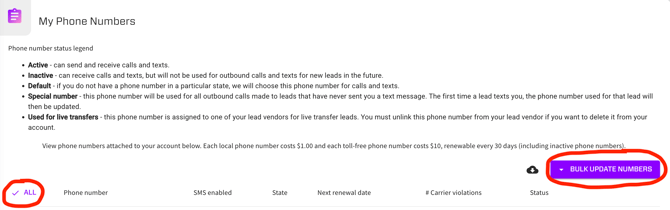
Once your branded calling has been approved as verified in the Phone Setup page in the left hand menu and under the Business Profile, you will need to enroll your phone numbers in Branded Calling if you have not already done so. To enroll your phone numbers in Branded Calling now, navigate to the Phone Setup page in the left hand menu, and under the Phone Numbers tab, go to the My Phone Numbers Section. First choose the "✔️ all" button in the left corner above your first phone number and towards the right hand side of the page select the "BULK UPDATE NUMBERS" options, and click "Enroll in Branded Calling."
If your Branded Calling or Caller ID isn't always displaying on leads' phones after enrolling your phone numbers in Branded Calling, register your Ringy phone numbers on https://freecallerregistry.com/fcr/. Check out this article for more information on Spam or Scam Likely Phone Numbers: Spam or Scam Likely Phone Numbers.
Disclaimer:
We cannot guarantee your Branded Calling will always display as it's subject per mobile carrier. Registering will significantly help in addition to the registration further helping with not showing as scam likely when dialing out to leads.